COA QR Codes for Product Packaging
Last updated June 12, 2026
A lab report does its most important work after the sale. The moment a customer wonders what is actually in the product they are holding, the COA needs to be one scan away, not buried in an email thread or a website footer. This guide covers what a packaging QR code should link to, why the obvious approaches break, and how batch-level lookup keeps printed codes working for years.
Why Packaging Needs a Durable Lab Report Link
The report a shopper needs is not your latest report. It is the report for their batch, the one printed on the package in their hand, possibly months after purchase. A tincture bought in March and opened in August still carries March's lot number, and the question “was this batch tested?” deserves an answer that does not depend on what you have published since.
Packaging is the one touchpoint guaranteed to be present at that moment. The shopper may not remember your domain or which retailer they bought from, but the label is right there. A QR code on the label turns the package itself into the path to its own certificate of analysis, and unlike a printed URL, nobody has to type anything.
Why a Homepage Link or Static PDF URL Breaks
The failure mode of most packaging QR codes is simple: the code is permanent and the destination is not. A printed code on ten thousand labels cannot be updated, so whatever it points at has to keep working for the entire shelf life of the product, and then some.
Linking straight to a PDF file URL is the most fragile option. Files get moved between folders, renamed during cleanups, or replaced when a host changes, and every printed code dies with the old path. Linking to your homepage survives longer but answers nothing: the customer scanned to verify a specific lot, and landing on a hero banner with no obvious route to lab results is where most of them give up.
There is also a structural problem no single static URL can solve: one product accumulates many batches. A code that points at “the COA” is wrong the day batch two ships. The destination has to be something that can represent many reports and route the shopper to the right one.
Batch and Lot Lookup, Explained
The fix is to put a lookup layer between the printed code and the file. Instead of encoding a file path, the QR code points at a stable destination that resolves to the correct report by batch. Each lab report carries its batch number, lot number, test date, and status; the code (or the shopper) supplies the batch; the system returns the matching report.
In practice that looks like this: the customer scans the code on the label, lands on a lookup page, and either the batch is already encoded in the link or they type the batch number printed beside the code. Either way they see the results for the exact lot they own, not a generic document, and not whatever report happens to be newest.
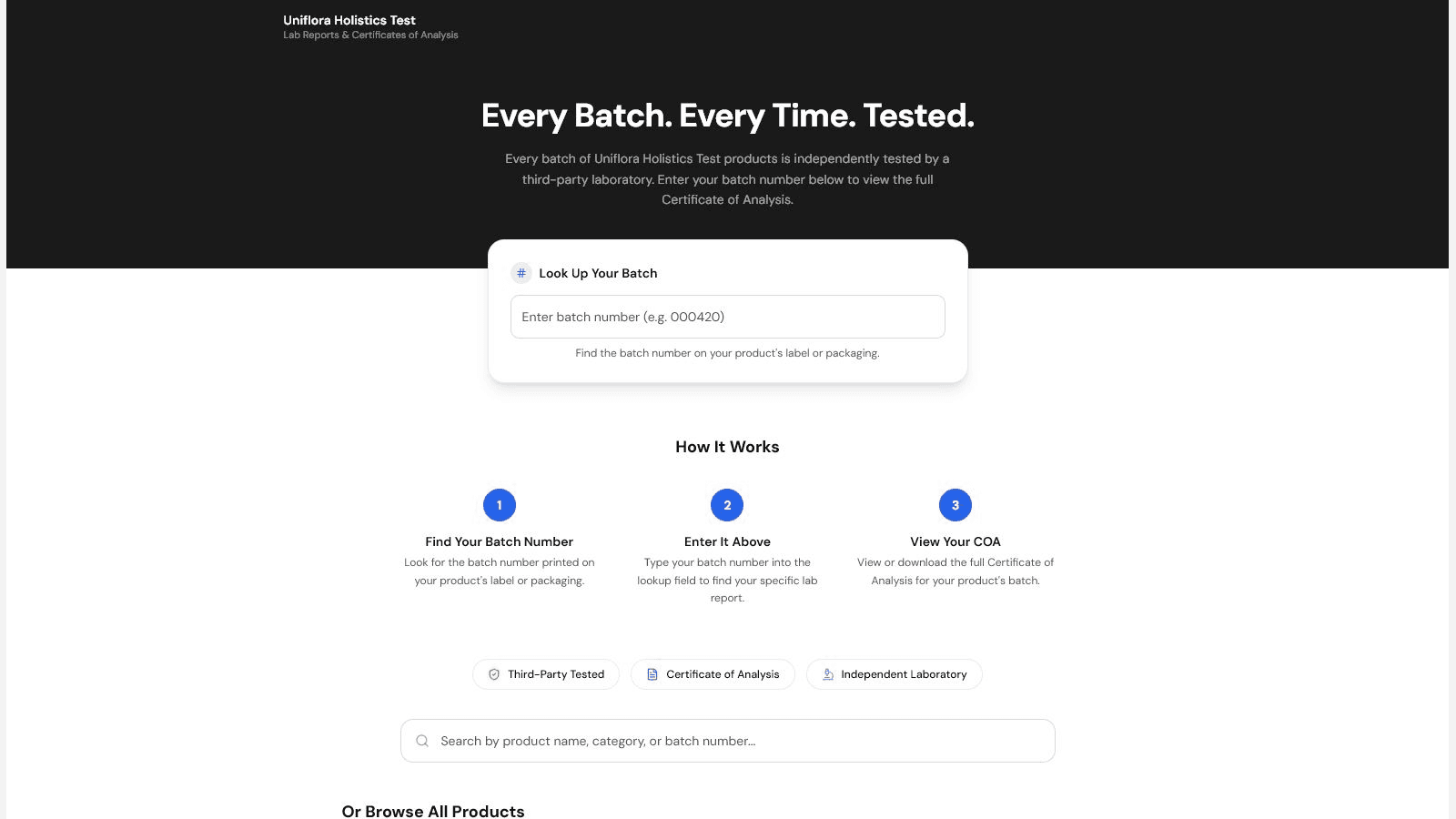
Because the lookup page is a stable URL and the reports behind it change, the printed code never goes stale. You publish a new batch report, retire an expired one, and every label already in the field keeps resolving correctly.
How LabLinks QR Codes Work
On the LabLinks Business plan, you can generate QR codes at three levels, depending on how your packaging is produced:
- Per lab report: the code opens that specific batch's COA. Use this when each batch gets its own label run, so the code on the package is the report for the contents.
- Per product: the code shows the product's current published reports. Use this for evergreen packaging printed in bulk, where reprinting per batch is not practical.
- Per portal: the code opens your full searchable results portal, where the shopper looks up their batch or lot. Use this on inserts, shelf cards, or wholesale materials that cover many products.
Codes are customizable with your brand colors and a logo overlay, so they sit naturally in your label artwork, and each code downloads as PNG, SVG, or PDF. SVG is the one to hand your label printer, since it scales to any size without losing sharpness. When a customer scans, the report opens in the portal's embedded viewer with the batch details alongside the original document.
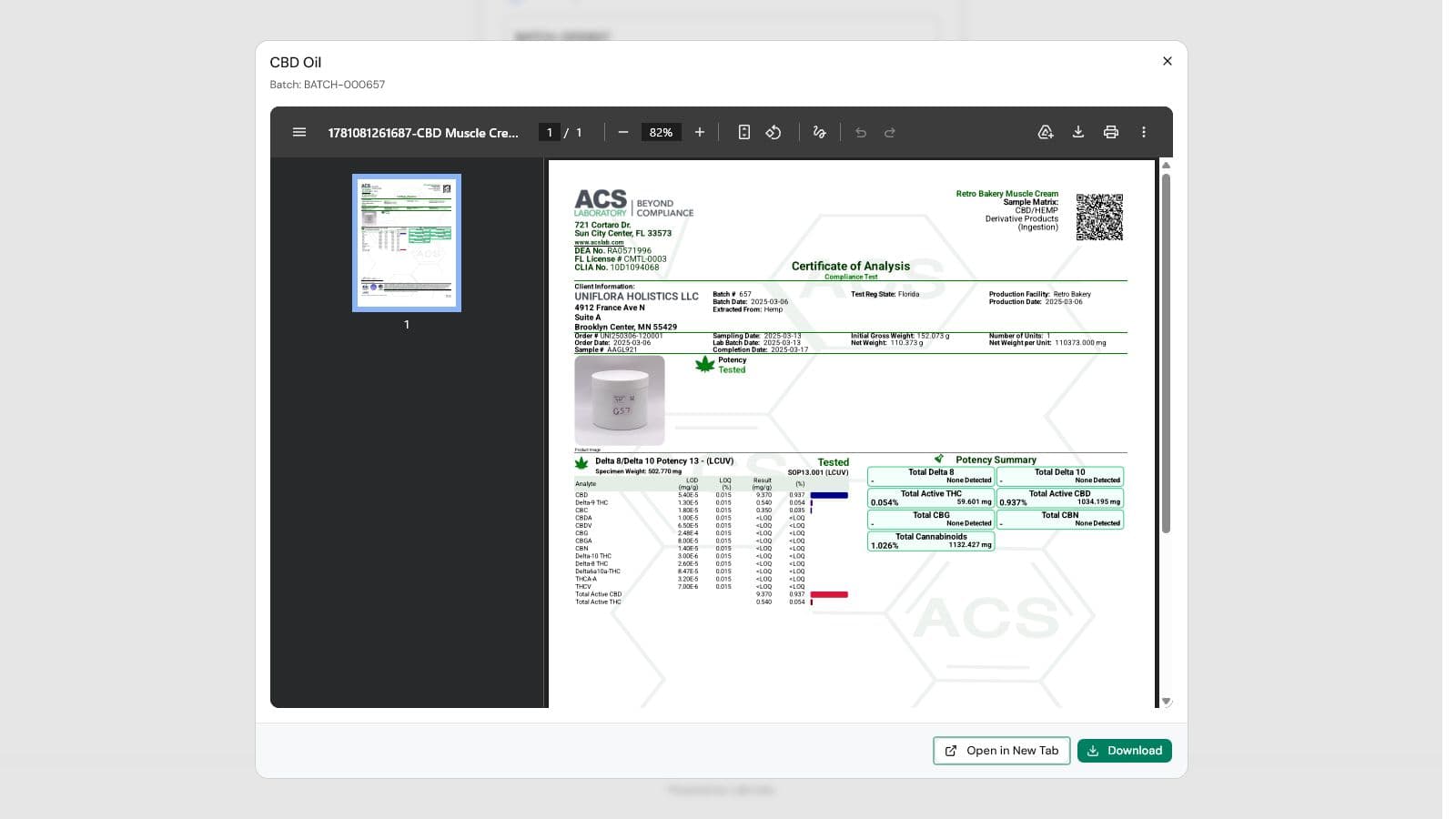
Every scan is counted, and the Business plan analytics dashboard shows scans alongside report views and downloads, so you can see which products' customers actually verify, and whether that QR code is earning its square inch of label space.
A note for hemp and CBD merchants: a QR code helps display your lab reports where customers look for them. It does not by itself satisfy any labeling requirement. This article is not legal advice; consult a qualified professional about the rules that apply to your products and the places you sell.